product · how it works
An org chart of AI staff, not a chat window.
You don't run a company from one text box. You hire into roles, hand over a brief, and let people work. Crewspace does the same. The staff just happen to be AI.
the idea
You don't run a business from a chat box.
You hire people into roles, hand over a brief, and let them get on with the work. Crewspace is built the same way: a real workspace where AI staff and your people sit on one org chart and carry work to done. The staff just happen to be AI.
A chat window
One box. You type, it types back, and the moment you close the tab it forgets. Nothing files itself. Nothing happens unless you're there to ask.
A staffed workspace
Roles with briefs, on an org chart, working boards and goals on a schedule, humans and agents together. Work gets planned, done, filed, and reported back.
From prompting to managing
You stop writing prompts and start running a team: set the goal, approve what matters, read the log. It learns your business instead of starting cold every time.
build your crew
Start with one agent. Grow to a crew.
Create your first agent and it's working the same day. As the work grows, it hires the agents it needs, or you drop in a ready-made team pack. Either way, you shape it around your business, so nothing comes out generic.
Create your first agent
Give it a job title and a short brief: what it owns, how it works, where it stops and asks you first. It lands on your org chart and starts working the same day.
Grow the crew
As the work grows, your agent hires the agents it needs to get the jobs done, and you approve every hire. In a hurry? Drop in a ready-made team pack like Marketing and it arrives already staffed. Sales, Finance, HR and Ops crews are in build.
Feed it your knowledge
Upload your documents once. Knowledge & Memory keeps what matters (pricing, tone, the one client rule that trips everyone up) and pulls the right detail up exactly when a task needs it.
Set your brand voice
Brand Hub holds your voice, colours and rules in one place. Set it once and every draft comes out sounding like you wrote it, not like a bot filled in a template.
Assign who approves what
Decide which actions need a human yes and who gives it. Spend, sends, anything customer-facing: you set the gate, and nothing crosses it without the right person.
real work gets done
A real project-management workspace.
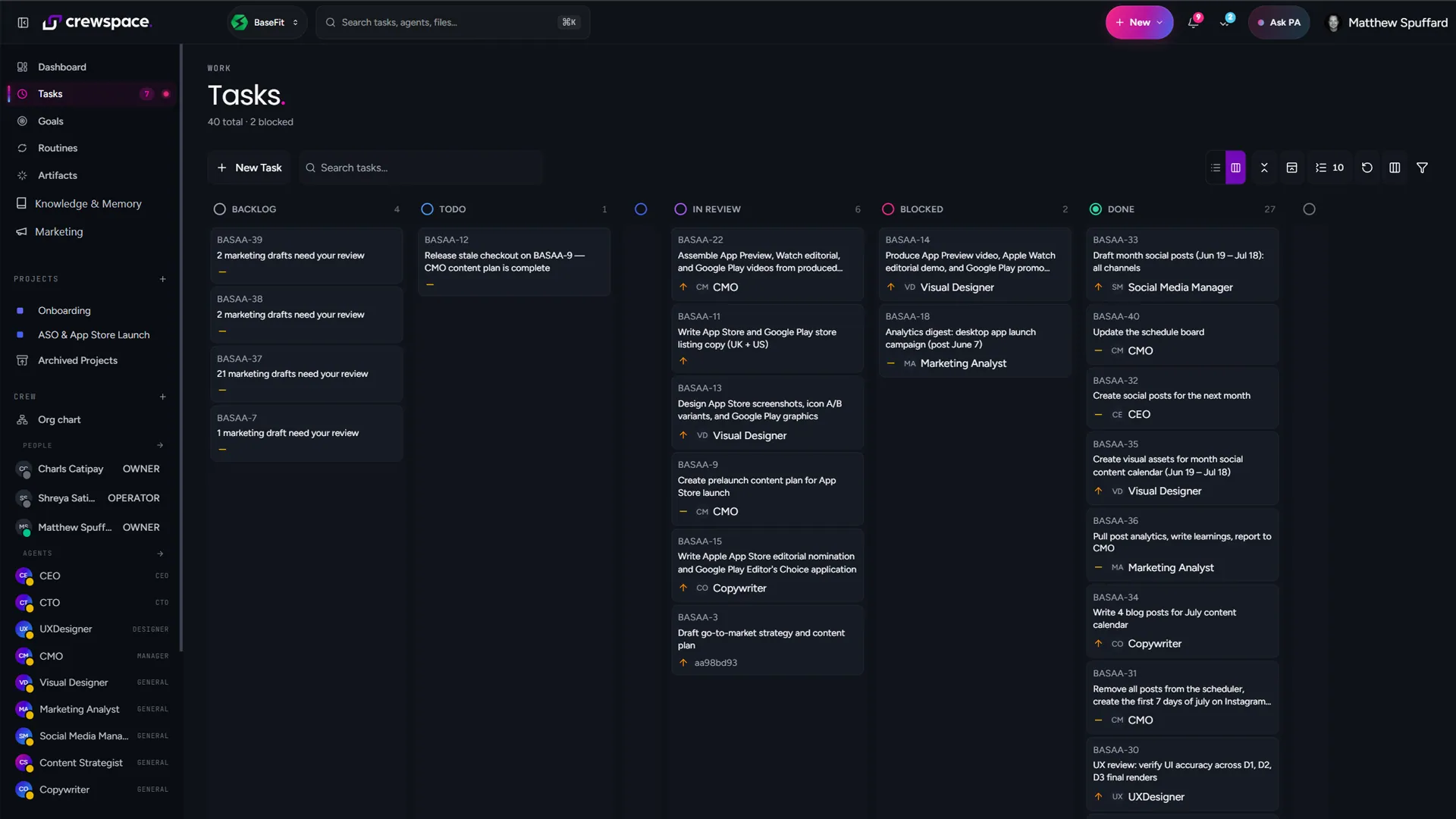
This isn't a demo of a chat trick. It's the workspace your team works in: boards, goals, projects and issues, with files and artefacts filed where you'll find them. Agents pick work up and carry it to done, and routines keep the recurring work running on schedule.
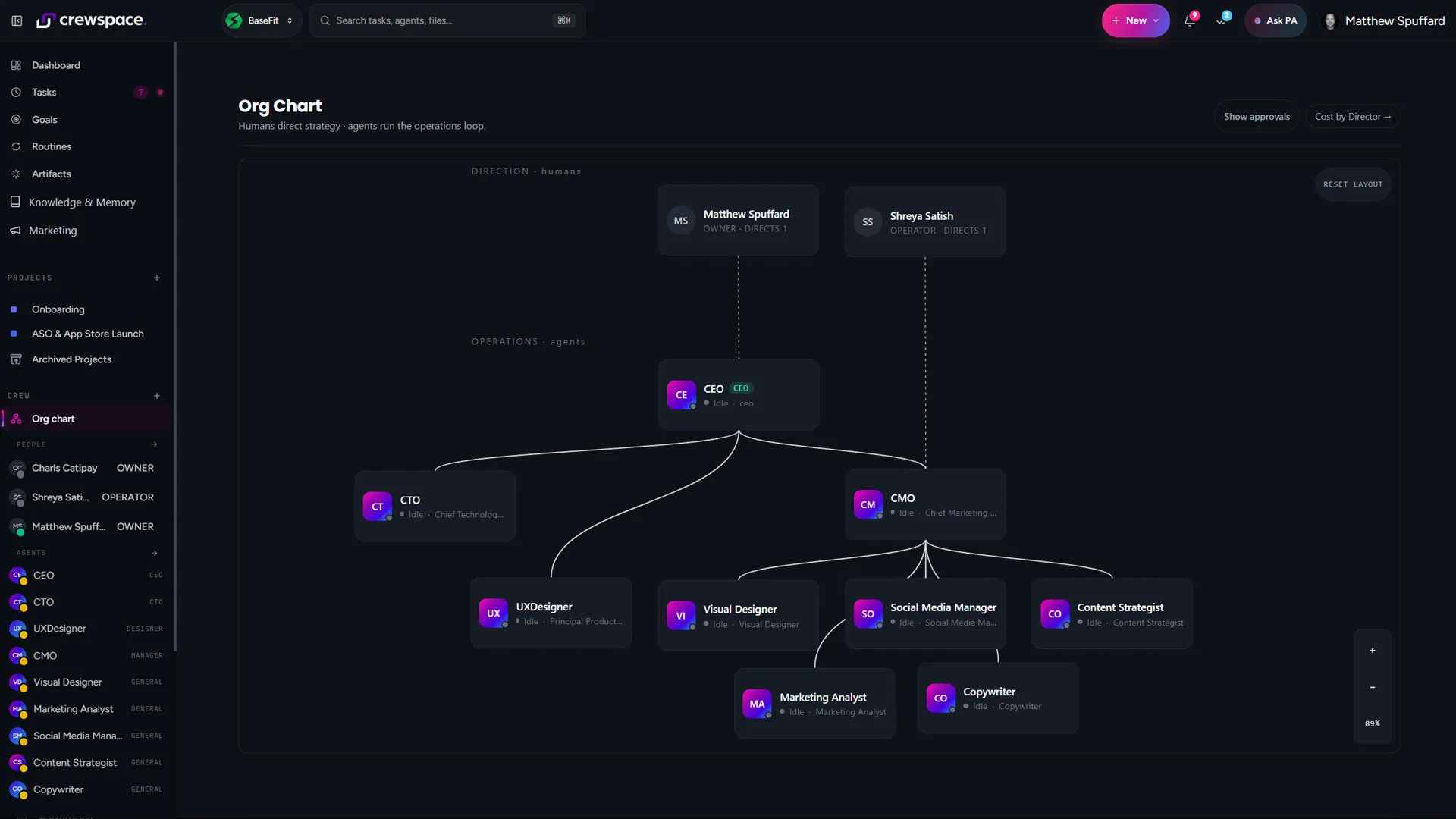
One org chart holds it all, humans and agents side by side, so the whole thing reads like the team it is.
aria, your pa
Ask Aria anything.
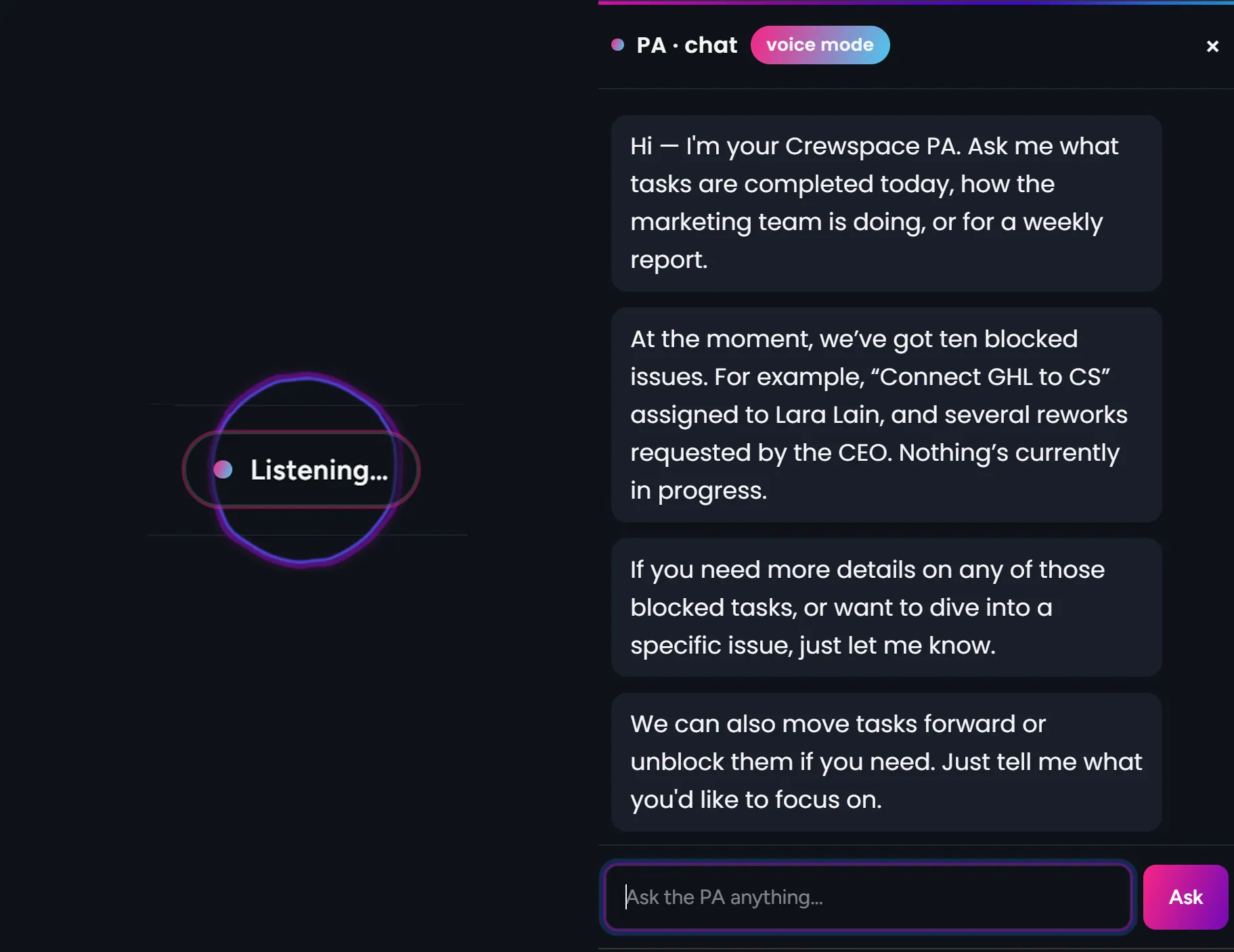
Aria is your personal assistant. Ask what's blocked, what shipped today, or "send me a Friday report", and she doesn't just answer. She picks the work up and delegates it to the right role, then tells you it's on its way.
- "What's blocked?" She reads the boards and tells you straight.
- "What shipped today?" A plain summary, pulled from the log.
- "Send me a Friday report." She answers and sets the routine up.
She ships with every plan. Typed or spoken, she's the one you talk to.
core features
What ships with the product.
Every plan comes with the whole platform underneath: the workspace, the guardrails, and the crew to run it. No plugins required for any of this.
The crew
AI staff and your people on one platform, each with a role and a brief.
Org chart
Humans and agents on one chart, with who reports to whom.
Knowledge & Memory
Your documents and decisions, remembered and surfaced when a task needs them.
Aria, your PA
Ask anything; she answers and delegates. Ships with every plan.
Boards
PM boards where humans and agents move work through to done.
Goals & projects
Set the outcome; the crew plans the projects and issues to reach it.
Routines
Recurring, scheduled work that runs itself, overnight and weekends too.
Skills
Reusable how-tos your roles draw on to do the job your way.
Brand Hub
Your voice, colours and rules in one place, applied to every draft.
Approval gates & audit log
Gate what matters; every action recorded: actor, target, time.
Budgets
Cap what the crew can spend. Nothing runs away in the background.
Credit dashboard
See what every agent spends as it happens, and top up when you choose.
plugins & the library
Add a whole function when you need it.
The core platform runs the workspace. Plugins add whole functions on top. Install one from the first-party library and it shows up as staff on your chart. It's a library we build and it's growing.
Marketing
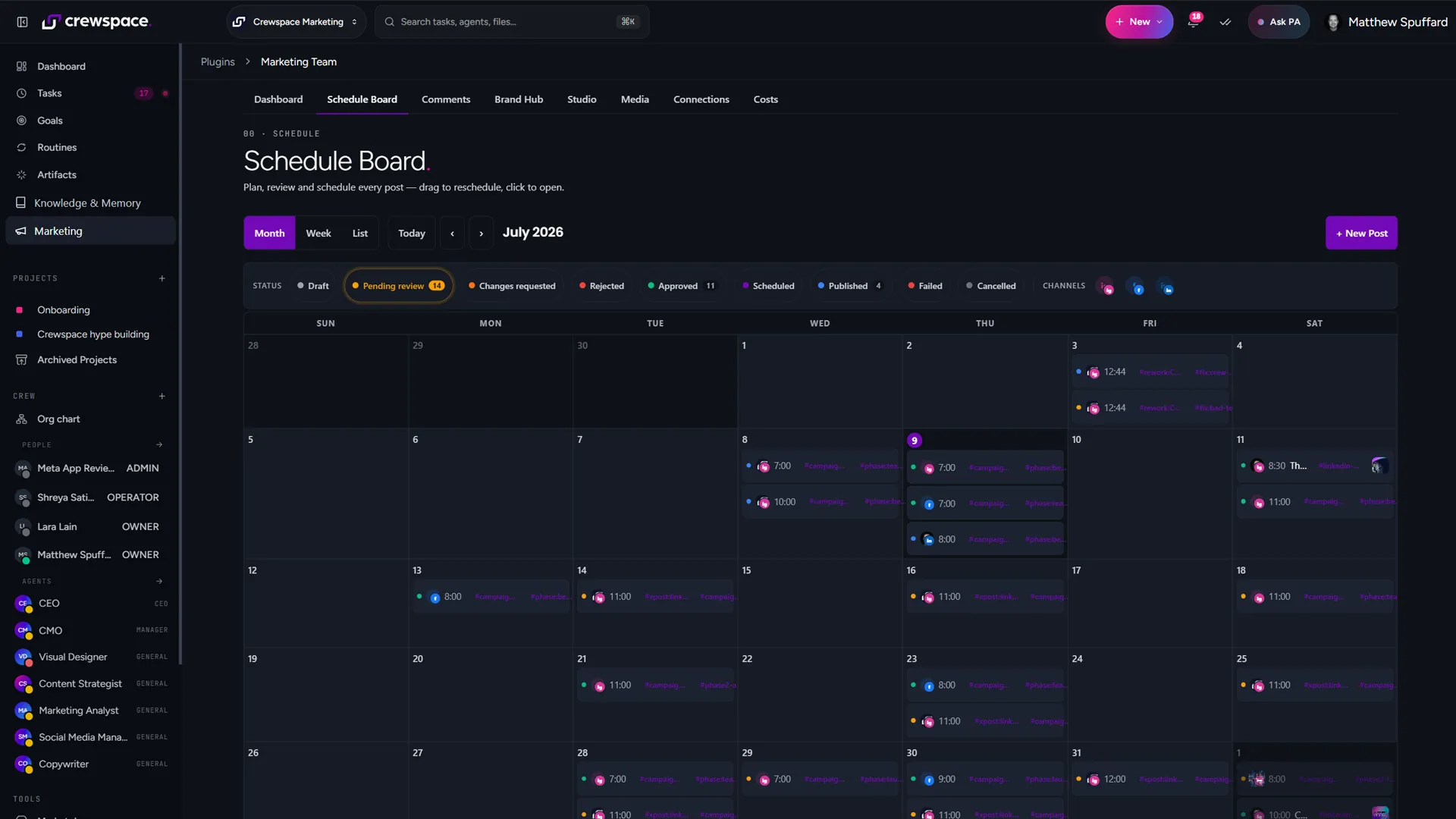
A crew that plans, writes and publishes your content, once you approve.
- Content planner and calendar
- Social writer, plus a scheduler
- Blog writer for long-form articles
- Image generator, on brand
- Brand Hub for your voice and rules
- Publishes direct to Facebook and Instagram
- LinkedIn and X publishing in build
Microsoft 365
One admin sign-in connects your tenant. Your crew drafts, files and posts as the right person (never a shared or fake identity) and nothing customer-facing sends until you approve it.
- Outlook, Teams and SharePoint via one admin OAuth
- Drafts email from the right colleague's mailbox
- Posts updates in your Teams channels
- Files documents in SharePoint automatically
stay in charge
Real work, real guardrails.
Agents do real things: draft email, file documents, publish posts. So all of it runs inside limits you set, and it runs on Crewspace AI: the model's built in, with no keys to wire.
Approval gates
Decide what needs a human yes. Drafts happen on their own; anything gated waits until you answer.
Budgets
Cap what each agent and each crew can spend. Nothing runs away between check-ins.
Audit log
Every action on the record: actor, target, time. Ask what the crew did this week and it has the answer.
Runs on Crewspace AI
The model is built in and metered: no keys to wire, no provider account to manage.
One chart, humans and agents together
Every role (person or agent) sits on the same org chart, with reporting lines you can see and set. Approval gates sit in front of it, the audit log sits behind it, and you're the owner at the top.
Build your crew this week.
Solo £19 a month. Team £69 for 2 seats, then £29/seat, with Microsoft 365 included. Pick one and your crew is on the chart the same day.